
Reports
Every report is generated live from your journal entries — there's no "refresh the numbers" step, and nothing to rebuild at month-end.
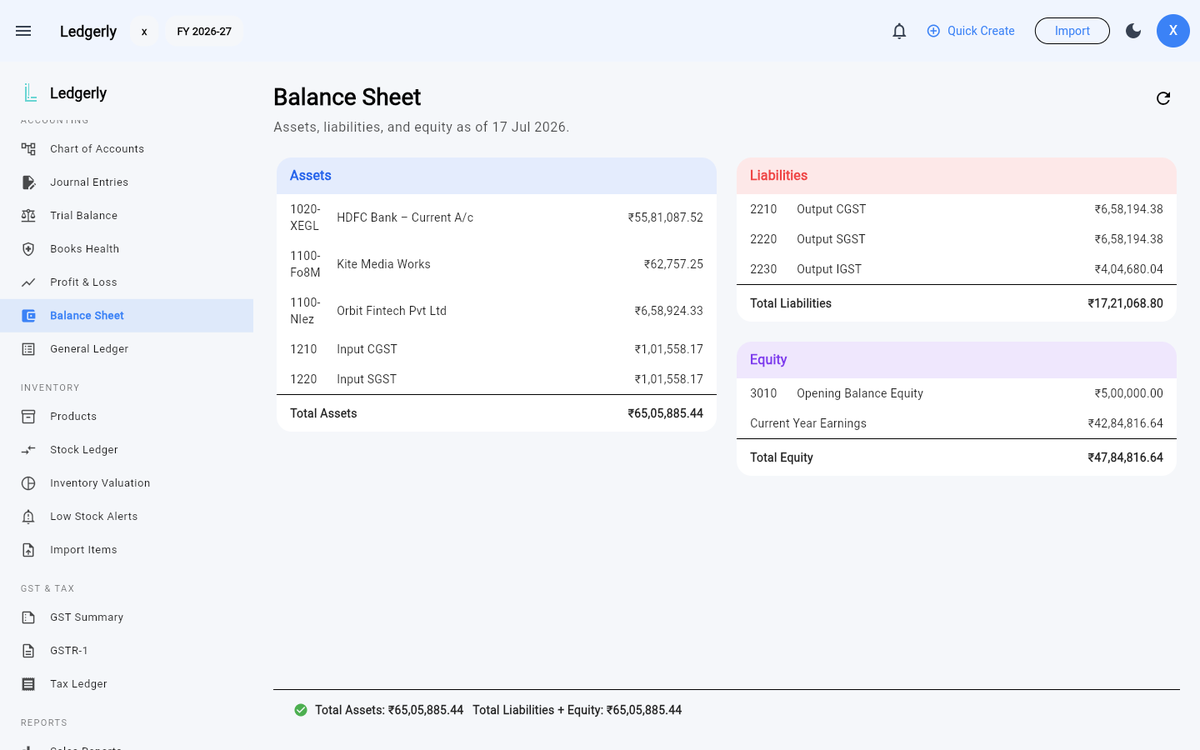
Accounting → Balance Sheet — assets vs liabilities + equity, with the balanced tick at the bottom.
Financial statements — Accounting menu
- Trial Balance — every account's debit/credit balance, with a tick when the books balance (they always should — Ledgerly won't post an unbalanced entry).
- Profit & Loss — income and expenses for the period, down to net profit.
- Balance Sheet — assets vs liabilities + equity, with a balanced indicator.
- General Ledger — every posting, account by account, traceable to its source document.
- Journal Entries — the raw double-entry record, including manual journals you create yourself.
- Books Health — seven automated checks that scan your books for problems, so issues surface before your accountant finds them: balances sitting on the wrong side, unbalanced entries, drifted account balances, orphaned journal lines, payments that never posted, lines pointing at a deleted account, and tax accounts that disagree with the documents behind them. Where a problem is safely repairable, Ledgerly offers a one-click fix.
Business reports — Reports menu
- Sales reports — revenue over time, by customer and by item.
- Expense reports — where the money goes, by category and vendor.
- Aging — receivables and payables bucketed by how overdue they are.
- Cash flow — money in vs money out across the period.
- Customer statements — a statement of account for any customer: invoices, credit notes, payments, running balance. Ready to send at month-end.
- Vendor statements — the same for suppliers.
Exporting
Reports export to Excel/CSV or PDF, and invoices generate PDFs with your branding. Your data is never locked in.