
Imports & migration
Moving to Ledgerly shouldn't mean re-typing your books. The Imports menu covers migration from Tally and Excel, plus the recurring imports you'll do every month.
Start with the template
Every import page has a Download template button, and they all give you the same file — Ledgerly_Import_Template.xlsx. One workbook, one sheet per import:
| Sheet | What goes in it |
|---|---|
| Read Me | How to fill the rest in. Nothing is read from this sheet. |
| Masters | Ledger accounts, customers, vendors, banks, and their opening balances. |
| Inventory Items | Products and services, with opening stock. |
| Sales Invoices | Outward supplies, one row per invoice. |
| Purchase Bills | Inward supplies, one row per bill. |
| Bank Statement | A statement to reconcile. |
Fill in only the sheets you need — a sheet you never touch imports nothing. Each one ships with an example row marked (example); type over it or delete it, and either way it's skipped rather than imported.
The template is worth downloading fresh rather than reusing an old copy: column names occasionally change between versions, and the Read Me records the date the file was generated.
The columns are already formatted
The date columns are set to dd/mmm/yyyy, so whatever you type normalises as you enter it — 11/09/2025 becomes 11/Sep/2025. That isn't only cosmetic: a month shown as a name can't be misread as a day, which is the single most common way an import goes quietly wrong.
Amount columns are formatted in the Indian convention (1,18,000.00), the same way figures appear everywhere else in Ledgerly, and every column is sized to fit its contents so nothing spills into its neighbour.
Dates: what's accepted
You don't have to use the template's format. Every importer reads all of these:
11/09/2025 · 11-09-2025 · 11.09.2025 · 2025-09-11 · 11/09/25 · 11-Sep-2025 · 11 September 2025
A real Excel date cell works too, as do the trailing times some exports add.
One thing to know: a numeric date is read day-first, so
11/09/2025is 11 September, not 9 November. Where day-first can't be a real date the reading flips —09/25/2025has no 25th month, so it can only be 25 September. This is why the template displays the month as a name.
Import everything at once
Imports → Import Workbook takes the filled-in workbook and brings in every sheet you populated, in one pass.
Before writing anything it shows you what it found on each sheet. Click Review rows on any sheet to see every row it read, laid out in the same columns as the sheet you filled in — so you can check the figures against your spreadsheet before anything is posted.
Each row shows:
- the row number from your file, so anything that needs fixing points at the right line;
- a tick, a duplicate marker, or a cross for rows that won't import;
- the values as Ledgerly understood them — the date it read, the amount it parsed — rather than the raw text. If a date came through as the wrong day, this is where you'll see it.
Where a sheet has rows that won't import, a Problem column says why, and one click narrows the table to just those. Nothing is written until you confirm.
Sheets run in a fixed order, because each depends on the one before it:
- Masters — so invoices and bills can match a customer or vendor by name.
- Inventory Items — so line items can link to an item.
- Sales Invoices
- Purchase Bills
- Bank Statement — last, because matching needs the documents to exist already.
Two sheets need something you supply on the page rather than in the file. Masters opening balances are dated by the as at date you pick. Bank Statement needs the bank account it belongs to and the contra account to post the other side against — nothing in a statement says which account it came from. Leave those unset and the bank sheet is skipped with a note; everything else still imports.
If one sheet fails, the rest still run. You get a per-sheet result at the end saying what landed and what didn't, rather than a half-finished import you have to work out for yourself.
One sheet at a time
The individual pages are unchanged and remain the place to go when you want to review row by row, use a custom column mapping, or import just one thing:
- Imports → Masters & Opening Balances — also accepts Tally Masters XML: export Masters from Tally, upload the XML, and Ledgerly parses your ledgers and parties.
- Imports → Sales — invoices from Excel.
- Imports → Purchases — bills from Excel.
- Imports → Bank — statements for reconciliation, see Banking.
- Imports → Inventory — products and services.
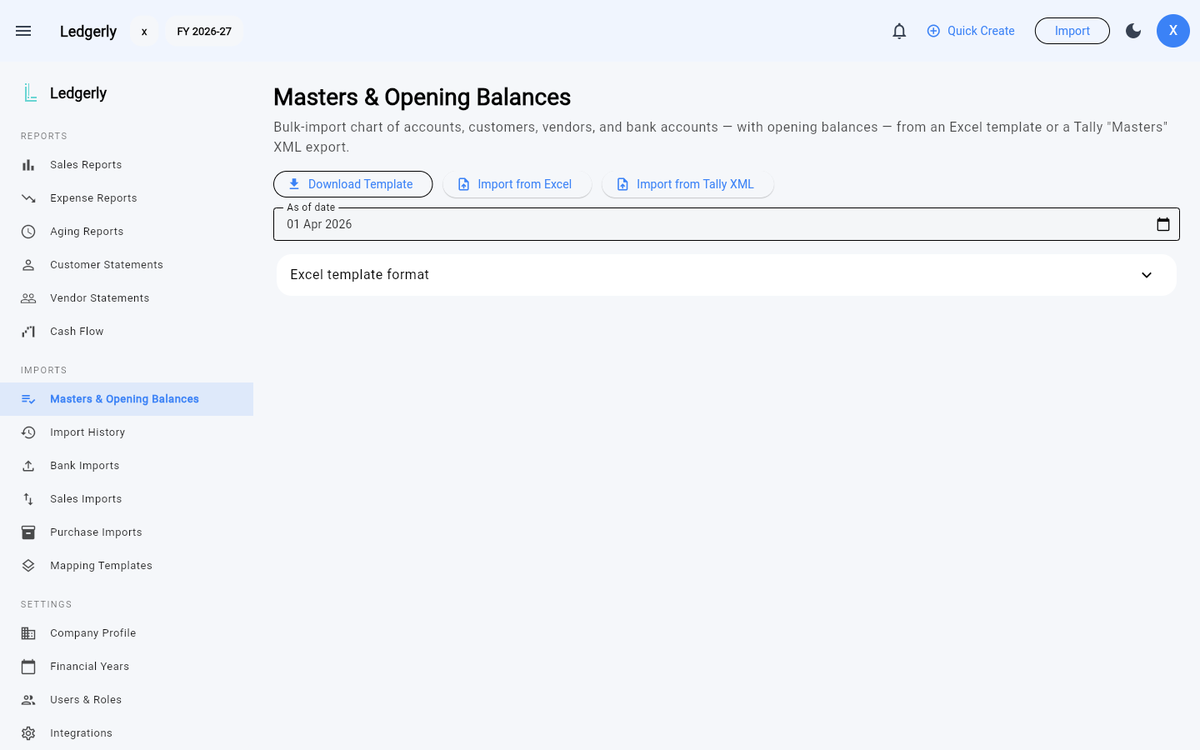
Imports → Masters & Opening Balances — download the template, or import from Excel / Tally XML.
You can upload the same workbook on any of these pages. Each one reads only its own sheet and ignores the others, so there's no need to split the file up.
Every import shows a review table before anything is written: check the parsed rows, fix classifications, then confirm. Opening balances post against the Opening Balance Equity account, so your books start balanced.
Files that didn't come from Ledgerly
A spreadsheet from your bank, your old accountant or another package works too. If it has no sheet matching one of ours, the importer reads its first sheet exactly as before.
Bank exports vary a lot, so the bank importer also recognises the common wordings itself — Txn Date, Narration, Withdrawal, Deposit and so on — and finds the header row even when there are several rows of account details above it.
Mapping templates
When a layout doesn't match and isn't recognised, Imports → Mapping Templates lets you map it once — which column is the date, the narration, the amount — and reuse that on every future import of the same format.
Import history
Imports → History logs every import: when, what file, how many rows — so you always know what came from where.