
Sales & invoicing
Everything sales lives under the Sales menu: customers, invoices, sales orders, credit notes and receivables.
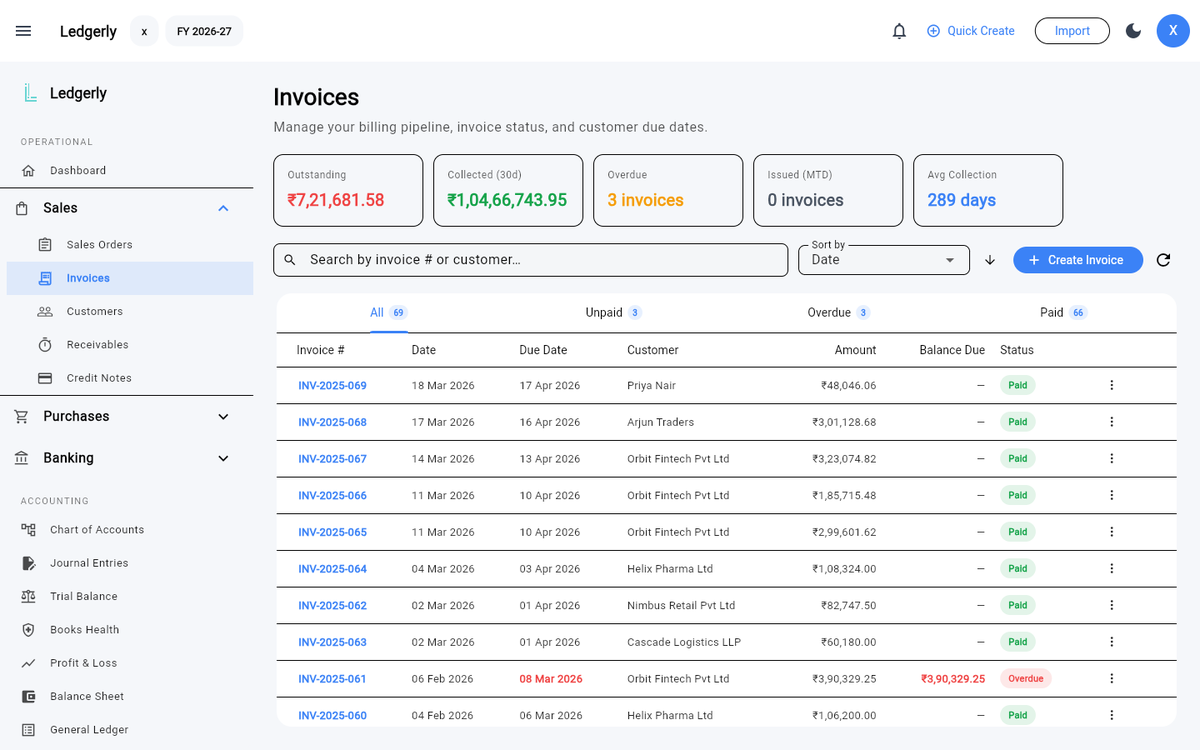
Sales → Invoices — the billing pipeline with outstanding, collections and overdue at the top.
Customers
Add customers under Sales → Customers with their billing details, state and GSTIN. The customer's state matters: it drives the place of supply on their invoices, which decides whether CGST + SGST or IGST applies.
Creating an invoice
Sales → Invoices → Create Invoice opens the invoice dialog:
- Customer & dates — pick the customer, invoice date and due date.
- Document type — Tax Invoice for an ordinary taxable supply, Bill of Supply where you are not charging tax, Invoice-cum-BoS for one unregistered buyer taking taxable and exempt goods together, or Revised for supplies made between your registration taking effect and your certificate being issued. A revised invoice asks for the number and date of the document it revises — it will not post without them.
- Transaction type — B2B (registered buyer), B2C (consumer), Export / SEZ, Nil-rated, Exempt or Non-GST supply:
- Export / SEZ supplies are inter-state by law, so Ledgerly locks GST to IGST on every line.
- Nil-rated, Exempt and Non-GST all lock every line to 0%, but they are reported in three different places on GSTR-1, so pick the one that actually describes the supply.
- Place of supply — Ledgerly compares it with your company's state and applies CGST + SGST (same state) or IGST (different state) automatically.
- Line items — description, HSN/SAC code, quantity, rate and GST %. Items linked to inventory update stock when the invoice posts.
- Create Invoice posts the invoice: revenue, GST output and receivable journals are written to your books in one balanced entry, and a confirmation appears.
Drafts
Not ready to post? Save Draft stores the invoice without touching your books — no journal entries are created. Drafts can be reopened, edited and posted later from the invoice list.
A draft's number is taken. Saving a draft reserves that invoice number, so no other document can use it — the same check that runs when you post. Two documents sharing a number breaks your GSTR-1 document series, and it is much easier to refuse the second one now than to unpick it at filing time.
That holds even if you throw the draft away. Discard draft asks for a reason and marks the draft discarded rather than deleting it, because Rule 56(8) does not allow erasing a record. Its number stays used, so your series will show a gap — and the GSTR-1 Problems tab will point at that gap when you come to file. That is working as intended; a gap you can explain is fine, a gap you cannot is the problem.
Invoice PDFs
Each invoice generates a professional PDF using one of five templates, with your logo and brand colour from Settings → Company Profile. Print it, download it, or share it with the customer.
Invoice numbers
Your invoice number may be at most 16 characters, using letters, numbers, hyphens and slashes only. That is a GST rule, not a Ledgerly one — the portal rejects anything else at filing time, which is the worst moment to find out. Ledgerly checks it as you type.
Bill numbers are not checked the same way, because a bill carries your supplier's number, which you did not choose and cannot correct.
Advances, refunds and goods on the move
Three documents you will need sooner or later, all under Sales.
Receipt vouchers — money before the supply
Took a deposit, retainer or advance before delivering anything? GST is payable on it when you receive it, not when you supply. Raise a receipt voucher under Sales → Receipt Vouchers.
If you cannot yet tell what rate will apply, the rules set 18%. If you cannot yet tell whether the supply will be inside your state or outside it, they treat it as inter-State. Tick the relevant box and Ledgerly applies the fallback — and prints on the voucher which one it used and why, so the figure is still defensible a year later.
The advance shows as unadjusted until you deal with it. That figure is your liability: it is what you would owe back if the supply never happened, and it is what GSTR-1 Table 11 reports.
Adjusting or refunding an advance
Open the voucher's menu and pick one:
- Adjust against invoice — the supply happened. The advance is released against the invoice, and your output tax is unchanged, because the invoice now accounts for it.
- Refund — it never will. The money goes back and the tax goes back with it, because no supply was made and the tax was never earned. Ledgerly issues a refund voucher naming the advance it reverses, which is what makes the two documents tie together.
Refund vouchers are listed under Sales → Refund Vouchers. There is no "create" button there on purpose — a refund only exists against an advance, so it is always raised from the receipt voucher it reverses.
Delivery challans — goods moving without a sale
Sending goods for job work, moving stock between your own premises, or sending something out on approval? That is a movement, not a supply, so it needs a delivery challan rather than an invoice — Sales → Delivery Challans.
Nothing is posted to your books. Ownership has not changed, only location has, so there is no sale, no output tax and no journal entry. Raise a tax invoice when the supply actually happens.
The PDF prints in triplicate — marked for the consignee, the transporter and you — because the rules require all three copies, each marked.
If you are sending goods for job work, they must come back within a year (three for capital goods) or the movement becomes a supply. The Delivery Challans page counts your open job-work challans for exactly that reason.
Payments & receivables
Record payments against an invoice as they come in — partially or in full. Sales → Receivables shows who owes what, and the invoice list's KPI cards summarise outstanding amounts, collections in the last 30 days, overdue invoices and average collection days.
Credit notes
Issued a refund or return? Create a credit note under Sales → Credit Notes, linked to the original invoice. The credit note posts its own reversing journals — revenue and GST are adjusted properly, not just marked down.
Sales orders
Track confirmed orders before invoicing under Sales → Sales Orders, then convert them to invoices when you fulfil them.